Best fit
Google Workspace users, Android users, students and teams already in Docs, Gmail and Drive.
ChatGPT alternatives
By Daniel Reeve · tested and updated September 2026
Gemini is the obvious ChatGPT alternative for people who already use Google products. It can be convenient for Google ecosystem work, multimodal prompts and everyday questions, but it is not automatically the best assistant for every task.
Quick answer
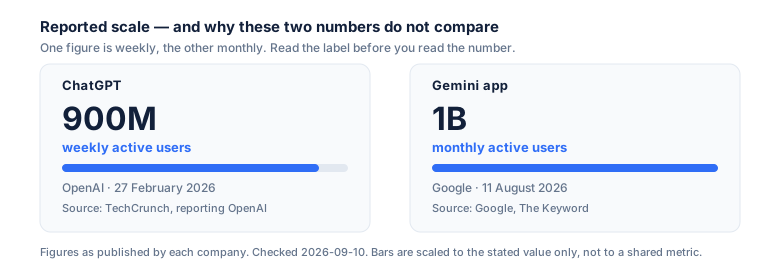
Do not choose on user numbers. A billion monthly users tells you about Android distribution, not about answer quality, and the two are genuinely unrelated. Choose on whether the assistant can reach the files you work in.
Decision map
Google Workspace users, Android users, students and teams already in Docs, Gmail and Drive.
Users who want the strongest writing tone may still prefer Claude; users who want sources may prefer Perplexity.
Use Gemini for Google-context tasks, then compare the final answer with ChatGPT or Claude before sending.
The Google question
| Area | Useful for | Watch out for |
|---|---|---|
| Google ecosystem | Gemini is strongest when your workflow is already built around Google services. | Business features depend on account type and admin settings. |
| Research and search | Useful for web-aware questions and Google-adjacent discovery. | Open sources and verify dates; generated answers can still miss nuance. |
| Images and multimodal | Good for prompts involving images, screenshots or visual context. | Image generation and editing availability can vary by region and plan. |
| Desktop workflow | Many users still work through browser or Google surfaces rather than a classic desktop app experience. | Check the current official Gemini help page for app availability. |
What we could and could not verify
We checked each vendor's own documentation on 2026-09-10. Google publishes model names openly but not per-model token limits on its overview page, so we do not print numbers we could not read at source.
The current stable Gemini line is documented as Gemini 3.8 Flash, 3.7 Flash, 3.6 Flash, 3.5 Flash and Flash-Lite variants, alongside the 2.5 Pro family. Google model documentation.
1 billion monthly active users for the Gemini app, stated by Google on 11 August 2026. Google, The Keyword.
Google's model overview page does not list per-model context windows. We could have copied a number from a third-party blog. We did not, because we could not confirm it at the source.
Google AI plan pricing varies by country and bundle. Check the plans page for your own region rather than trusting any single figure on any comparison site, including this one.
Test it properly
Take a task that touches a real Google file — a document in Drive, a thread in Gmail, a sheet you actually maintain — and ask Gemini to do it in place. Then do the same task by pasting the content into a different assistant.
If the integration saves you the paste and the reformatting, that is the whole case for Gemini and it is a good one. If it does not, you are comparing raw model quality, and there Gemini has no structural advantage.
Sources
Every figure on this page was read from the official documentation below on 2026-09-10. Prices, limits and model names change without notice — the source is authoritative, this page is not.
FAQ
It depends entirely on which metric you accept. Google reported 1 billion monthly active users for the Gemini app in August 2026; OpenAI reported 900 million weekly active users for ChatGPT in February 2026. Weekly and monthly counts are not interchangeable, and a distribution advantage — Gemini ships inside Android and Google surfaces — is not the same as a quality advantage.
Google's model documentation lists Gemini 3.8 Flash as the newest stable entry alongside 3.7, 3.6 and 3.5 Flash and Flash-Lite variants, plus the 2.5 Pro family (checked 2026-09-10). Google iterates the version number frequently, so check the model page rather than any comparison article, this one included.
We are not going to print a number we could not verify. Google's public model overview does not list per-model token limits, and the figures circulating on comparison sites are mostly copied from each other. If context size is your deciding factor, check the individual model page in Google's API documentation for the exact model you will use.
This is the strongest case for it. If your mail, documents and calendar already live in Google, an assistant that can reach those files directly usually beats a marginally better model that cannot. The integration, not the benchmark, is the reason to choose it.
Not on the strength of a user-count headline. Take one real task you do weekly, run it through both, and compare how much editing each answer needs. That five-minute test tells you more than any ranking, including ours.